
Webhooks - PHP/Data API
The DocuSign API includes an optional eventNotification object that you can use to add a Webhook to the envelope (document signing request) that will automatically send updates to the fmESignature Link file when certain events happen within DocuSign. We’ve included support in fmESignature Link (DocuSign Edition) to automatically receive the completed PDF when it has been signed by all parties using the eventNotification Webhook.
Webhooks are the most efficient way of retrieving the completed PDF from DocuSign as you don’t need to be continually polling DocuSign for updates to each outstanding signing request – DocuSign limit polling for updates for the same envelope to no more than once every 15 minutes.
If you are new to webhooks we recommend using the free OttoFMS product from Proof Systems & Humans. Once installed you can register a new webhook url in a few minutes - see the Webhooks - OttoFMS guide for further details.
If you would like to use the supplied PHP file that uses the FileMaker Data API please follow the instructions below.
fmESignature Link (DocuSign Edition) includes a ‘webhookSignedEnvelope.php’ php file that you can upload to your PHP web server that can be used to process incoming Webhook notifications from DocuSign when a document has been completed.
The Data API Webhooks currently don't work with FileMaker Cloud 2.x deployments due to the differences in how authentication is handled for FileMaker Cloud 2.x users with the Data API.
To use the PHP Webhooks you will need to ensure the following are in place:
- you will need to enable the Data API and host the PHP file where it is publicly accessible to Docusign
- your FileMaker Server will need to be using a domain name with an SSL certificate
- you need to install the supplied ‘webhookSignedEnvelope.php’ php file on your Web Server running PHP and determine the URL to the webhookSignedEnvelope.php file from the outside. For example if your web server has a domain name of
https://www.myserver.com
and you create a folder called fmESignatureLink and place the ‘webhookSignedEnvelope.php’ php file inside the fmESignatureLink folder the URL will be:
https://www.myserver.com/fmESignatureLink/webhookSignedEnvelope.php
- the URL needs to begin with HTTPS: DocuSign only support HTTPS Webhook URLs
- you will need to modify the value of the $hostname variable in the webhookSignedEnvelope.php php file with your FileMaker Server DNS name
Once you have determined the URL to the webhookSignedEnvelope.php file you will enter this in the Completed Event Webhook field when sending a Request:
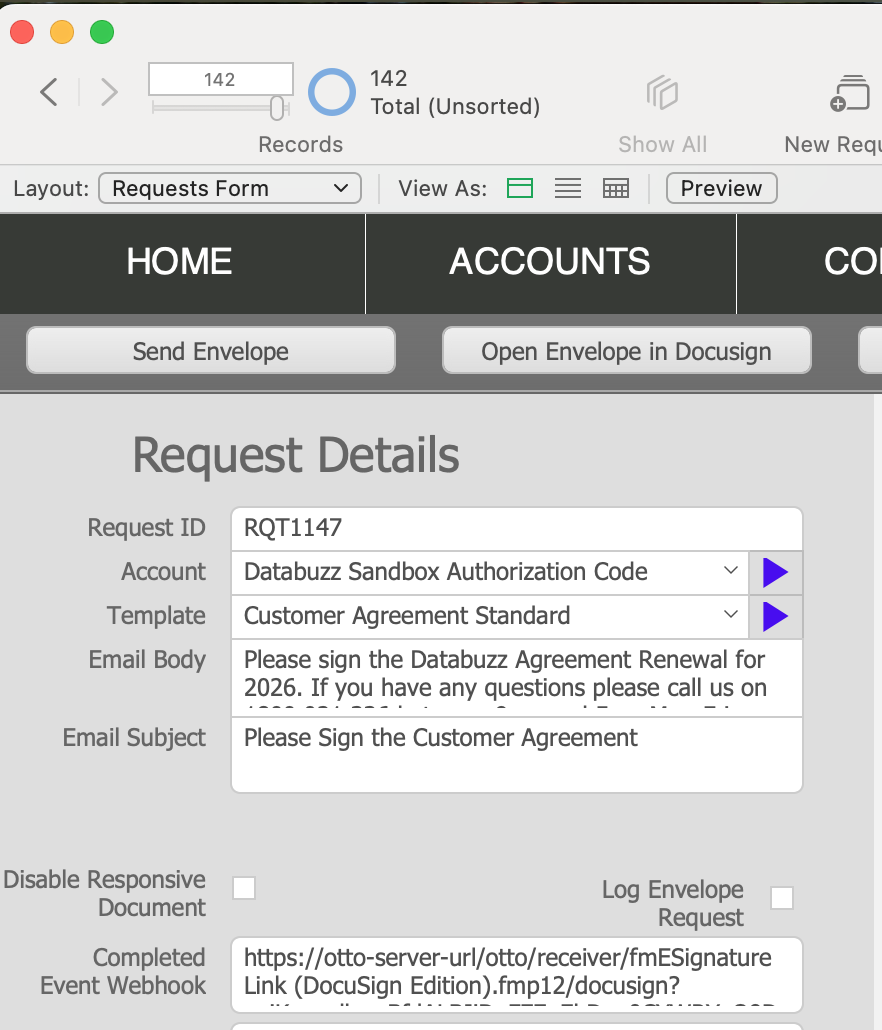
Docusign will send a notification to that URL when the Envelope has been completed which will create a new record in the Webhooks table, the EnvelopeID field will be populated with the DocuSign Envelope ID and the Data field is populated with the complete body of the webhook JSON data and then the OttoReceiver script is performed which downloads the completed PDF.
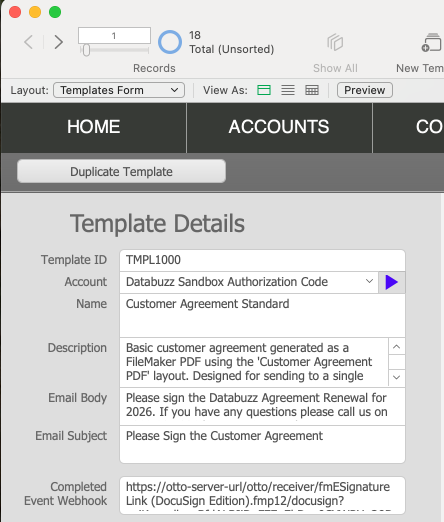
You can also enter this URL into the Completed Event Webhook field for the Template record so you don't need to enter this for each Request:
You can test this is working successfully by sending another test Request to yourself from the fmESignature Link (Docusign Edition) file - remember to enter the Webhook URL in the Completed Event Webhook field. Once you have completed signing for that request you can monitor the request and see if the Signed PDF and Envelope Status fields are updated automatically – this normally happens in under a minute in our experience. Each Webhook that is sent by Docusign should also create a new record in the Webhooks table record which you can view by navigating to the Webhooks layout via the layouts menu.